
Command line arguments
Introduction
If the program is executed with -h or --help option, the following quick help will be displayed:
Usage:
  GCodeGenerator.exe [OPTION...]

  -j, --json-file arg           Project JSON file
  -o, --output-directory arg    Output folder
  -t, --material-thickness arg  Material thickness to cut in mm (default:
                                0)
  -b, --box-height-3d arg       Box height in 3D in mm (default: 0)
  -d, --cut-depth-per-pass arg  Depth per pass to cut in mm
  -p, --bit-shape arg           Bit shape for drill size compensation:
                                straight, or v-shaped (default: straight)
  -m, --bit-diameter arg        Bit diameter in mm for drill size
                                compensation (default: 0.01)
  -k, --bit-angle arg           Bit angle in degrees for v-shaped bits for
                                drill size compensation (default: 0)
  -f, --bit-cutter-height arg   Bit cutter height in mm at which the
                                maximum diameter is reached (default: 0)
  -g, --outer-sizing            Box sizes are for outside borders (inner
                                area will be smaller), default: inner
                                sizing
      --finger-joint            Add finger joints (box joints) to the 4
                                wall corners so panels can be assembled
                                without glue
      --finger-size arg         Finger width in mm (Default: material
                                thickness) (default: 0)
      --finger-count arg        Number of fingers on an edge (Default:
                                automatic based on finger size) (default:
                                0)
      --finger-clearance arg    Extra clearance added to finger slots in mm
                                (Default: 0) (default: 0)
  -r, --recess-depth arg        The depth of recess in mm (Default: no
                                recess) (default: 0)
  -x, --feedrate-x arg          Feedrate to use for x-axis (default: 200)
  -y, --feedrate-y arg          Feedrate to use for y-axis (default: 200)
  -z, --feedrate-z arg          Feedrate to use for z-axis (default: 100)
  -l, --outline                 Enable side outline cutting (default: true)
  -c, --components              Enable component cutting (default: true)
  -e, --screw-size-top arg      Screw diameter for top side in mm (Default:
                                0 - no screws) (default: 0)
  -w, --screw-size-bottom arg   Screw diameter for bottom side in mm
                                (Default: 0 - no screws) (default: 0)
  -i, --screw-head-diameter arg
                                Screw head diameter in mm (default: 0)
  -a, --screw-head-height arg   Screw head height in mm (default: 0)
  -n, --screw-extra-margin arg  Screw extra margin in mm (default: 0)
  -s, --simulate                Simulate, do not write NCs
  -h, --help                    Show this help message and quit
Both short and long versions of the arguments can be used.
The arguments --json-file, --output-directory, --material-thickness, and --box-height-3d are mandatory. The last two arguments can also be given in the JSON file. If both JSON and the command-line has these arguments, the command line values will be used. Other arguments have default values as mentioned above. To set an argument to false, use the long version and assign the value false. For example, to disable outline cut, use --only-project=false. Similarly, for verbose, use either -v or --verbose. Argument values can be provided with a space or an equal sign if long versions are used. For instance, both --json-file test.json and --json-file=test.json are valid usage. For short versions, only space allowed, e.g., -b 30.
--json-file
A valid path to JSON file to be used as input. Can be a relative path (starting from the working directory) or an absolute path. You can use online visual box designer, JSON Creator or refer to MIDILLI JSON Definition document if you need help.
--output-directory
The directory to write the output files to. Using . (dot) will use the current working directory. The final files will be written into a new folder having the name of the --json-file.
--material-thickness
This value is used to calculate the depth required for creating holes for components and/or screws. The value is in millimeters (mm).
Additionally, this value is used to determine the dimensions of the left, right, front, and bottom sides (if enabled) based on whether the --outer-sizing parameter is active. See Coordinate system and effects of sizing parameters for more info.
This value is mandatory.
It can be given in the JSON (under Generic, as value “material_thickness“) as well as in the command line. Command line will override the value if provided.
--box-height-3d
The height of the box in millimeters (mm). If --outer-sizing is used, this will be the outer height of the box. Otherwise, it is the inner height of the box.
This value is mandatory.
It can be given in the JSON (under Generic, as value “box_height_3d“) as well as in the command line. Command line will override the value if provided.
--single-part
Merges all sides into a single file (.scad or .stl) to construct a complete 3D box. To separate top or bottom, use --separate-top and/or --separate-bottom respectively.
Default: false
--separate-top
Separate top side of the box from the rest of the sides and save it as a separate file if --single-part option is used. This will also leave the _Top.scad project file in the folder.
--separate-bottom
Separate bottom side of the box from the rest of the sides and save it as a separate file if --single-part option is used. This will also leave the _Bottom.scad project file in the folder.
--separate-back
Separate back side of the box from the rest of the sides and save it as a separate file if --single-part option is used. This will also leave the _Back.scad project file in the folder.
--separate-front
Separate front side of the box from the rest of the sides and save it as a separate file if --single-part option is used. This will also leave the _Front.scad project file in the folder.
--separate-left
Separate left side of the box from the rest of the sides and save it as a separate file if --single-part option is used. This will also leave the _Left.scad project file in the folder.
--separate-right
Separate right side of the box from the rest of the sides and save it as a separate file if --single-part option is used. This will also leave the _Right.scad project file in the folder.
--screw-size
Screw hole diameter to be drawn as hole in millimeters (mm) on the top and/or bottom side of the box. Needs at least --separate-top or --separate-bottom to be used. Otherwise no screw holes will be generated.
This will also generate 4 cylindrical supports to fix the screws.
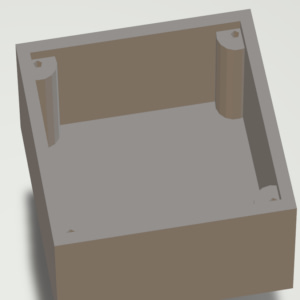
--screw-size is set to a value.Default: 0 mm, no screws.
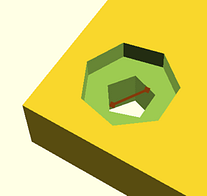
--screw-head-height
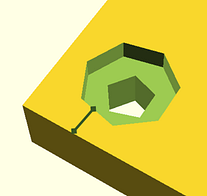
The depth of the screw-head to create counterbore/recessed screws given in millimeters (mm).
Default: 0 mm, protruding screw head.
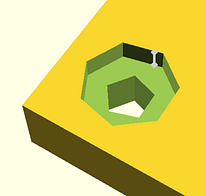
--screw-head-diameter
If the screws must be counterbore/recessed, any value given in millimeters (mm) (preferably greater than --screw-size) will create a circular shape to bury the head.
Default: 0 mm, protruding screw head.
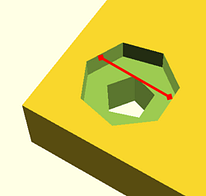
The images below show how --screw-head-diameter and --screw-head-height affect the creation of screw head related recesses.

--screw-extra-margin
By default, screws are added at the four corners of the top and/or bottom side of the box, leaving a margin of --material-thickness from the sides. If an additional margin is desired, any value given in millimeters (mm) will increase this gap.
Default: 0 mm, no additional margin.
--outer-sizing
If used, the sizes defined in the JSON file as well as the --material-thickness and --box-height-3d arguments will be used to create the outer volume with the given dimensions. Otherwise, these values will be used to create the inner volume with the given dimensions.
The value can be given in the JSON (under Generic, as value “outer_sizing“) as well as in the command line. Command line will override the value if provided.
Default: false, use inner dimensions.
--recess-depth
The depth of the recess for components in millimeters (mm).
Recesses also take the sizing from visible_diameter (priority) or visible_width and visible_height properties. Recesses may be helpful to have slightly lowered shapes to e.g., stabilize or limit the movement of button caps. This value does not change the behavior of the screw head recess (See --screw-head-height).
Default: 0 mm, no recess for the components
--draw-text
Whether to draw texts defined in the JSON file with call_name. Font size can be specified with silkscreen_font_size or with --font-size argument.
Default: true, draw text.
--font-size
The size of the font in pixels (px). The value is converted to OpenSCAD size value using the formula in its manual. This is only effective, if no silkscreen_font_size found for a call_name.
Default: 8 px.
--text-depth
The engraving depth for the text in millimeters (mm). If greater than material-thickness, material-thickness will be used. This value is used for all call_names.
Default: 1 mm.
--openscad-path
Path to OpenSCAD executable to convert .scad files to .stl files. Requires free and open-source OpenSCAD to be installed separately.
Default: C:\Program Files\OpenSCAD\openscad.exe
--keep-project-files
Keeps the OpenSCAD files (.scad files) after conversion to STL.
Default: false, remove .scad files after conversion to STL.
--only-project
Only creates .scad files and does not start STL conversion. This is useful e.g., to work on the files using OpenSCAD for fine-tuning or modifications.
--verbose
Shows more information during project creation and outputs of the OpenSCAD software during STL conversion.
--help
Shows the quick help with the list of arguments and their short descriptions.