Reference Documents
Technical documents that can be applied to multiple MIDILLI products.
JSON File Definition
Applicable on: SVG Generator, G-Code Generator, STL Generator
MIDILLI Tools require a JSON file to operate. An example file is provided in the tool manuals, which you can modify to meet your specific needs. Below is a detailed explanation of the mandatory (indicated in bold) and optional properties and parameters. The text enclosed in square brackets [ ] can be replaced if it begins with unique; otherwise, you should choose from the available options (e.g., [uniquePartName]_[Side]).
To create your own JSON file, you can also use our online Visual Box Designer or textual JSON Creator.
This JSON is a simplified version of the full configuration we use internally. It allows you to quickly customize your design without diving into complex data structures, offering a streamlined approach to controlling your project.
| Section | Property | Description | Parameter | Parameter description | Unit | Multiplicity |
|---|---|---|---|---|---|---|
| Generic | Specify generic properties | – | 1 | |||
| Generic | width | The width of the box* (on x-axis). | – | cm | 1 | |
| Generic | length | The length of the box* (on y-axis). | – | cm | 1 | |
| Generic | material_thickness | The thickness of the material. | – | mm | 0-1 | |
| Generic | board_height_3d | The height of the box* (on z-axis). | – | mm | 0-1 | |
| Generic | outer_sizing | Whether to include material thickness in the calculations. | – | bool (true or false) | 0-1 | |
| Generic | finger_joint | Whether to add finger (box) joints to the 4 wall corners so panels can be assembled without glue. Front/Back panels get protruding fingers, Left/Right panels get the matching slots. | – | bool (true or false) | 0-1 | |
| Generic | finger_size | The width of a single finger. If not set, defaults to the material thickness. A warning is printed if it is smaller than the material thickness. | – | mm | 0-1 | |
| Generic | finger_count | Number of fingers on each wall edge. If not set (or 0), it is calculated automatically from the edge length and finger size. | – | count | 0-1 | |
| Generic | finger_clearance | Extra clearance added to the slots so the fingers fit without sticking. Applied only to the slots that receive a finger (Left/Right); Front/Back notches stay at finger_size to keep the edge even. Default: 0. | – | mm | 0-1 | |
| [uniquePartName]_[Side] | Initiate creation of [Side] side of the part [uniquePartName]. Side can be: Top, Bottom, Left, Right, Back, Front. | – | 1-6 | |||
| [uniquePartName]_[Side] | [uniqueComponentName] | A unique component name to create a hole or rectangular shape on the [uniquePartName] [Side]. | – | 0-* | ||
| [uniquePartName]_[Side] | [uniqueComponentName] | – | location_x | X position of center of the [uniqueComponentName] relative to the [uniquePartName] [Side]. | cm | 1 |
| [uniquePartName]_[Side] | [uniqueComponentName] | – | location_y | X position of center of the [uniqueComponentName] relative to the [uniquePartName] [Side]. | cm | 1 |
| [uniquePartName]_[Side] | [uniqueComponentName] | – | drill_diameter | The diameter of the hole to open. Has priority over drill_width and drill_length. Set to 0 only to display text. | cm | 1 |
| [uniquePartName]_[Side] | [uniqueComponentName] | – | drill_width | The drill width of the rectangle to cut out. If drill_diameter is found, drill_width is ignored. Mandatory if drill_diameter is not used. Set to 0 only to display text. | cm | 1 |
| [uniquePartName]_[Side] | [uniqueComponentName] | – | drill_length | The drill length (y-axis) of the rectangle to cut out. If drill_diameter is found, drill_length is ignored. Mandatory if drill_diameter is not used. Set to 0 only to display text. | cm | 1 |
| [uniquePartName]_[Side] | [uniqueComponentName] | – | rotation | Clockwise rotation of the component (0-359). If call_name is set, text is also rotated around the component. | degree | 0-1 |
| [uniquePartName]_[Side] | [uniqueComponentName] | – | call_name | Text to assign to the component. Placed using visible_length and visible_width as margin. See rotation for more info. | text | 0-1 |
| [uniquePartName]_[Side] | [uniqueComponentName] | – | silk_screen_font_size | Custom font size for the text in pixels (px). | px | 0-1 |
| [uniquePartName]_[Side] | [uniqueComponentName] | – | visible_diameter | If a recess is desired in the shape of a circle instead of a rectangle, this value must be specified. If this value is not found then visible length and visible_width values are used. | cm | 0-1 |
| [uniquePartName]_[Side] | [uniqueComponentName] | – | visible_length | If the visible area of the component is not the same as the drill size, call_name uses this parameter to adjust the font margins keep the text above the visible section. If not found, drill_length is used. This value is also used for the recess length of the component. | cm | 0-1 |
| [uniquePartName]_[Side] | [uniqueComponentName] | – | visible_width | If the visible area of the component is not the same as the drill size, call_name uses this parameter to keep the text horizontally centered with the component. If not found drill_width is used. This value is also used for the recess width of the component. | cm | 0-1 |
The text [uniquePartName] can be replaced with any name, brackets should be removed, e.g, MyPart
However, [Side] should be replaced with one of Top, Bottom, Left, Right, Back, Front. Note: each side may appear only once for a [uniquePartName] part, e.g., MyPart_Top or MyPart_Left. If any of the sides are missing it will not be created.
Note: Use dot (.) if working with decimal numbers to separate the integer part.
Understanding 2D Coordinate Systems in MIDILLI Tools
Applicable on: SVG Generator, G-Code Generator, STL Generator
In the MIDILLI Tools, a 2D coordinate system is used for the parts and components. The box height is also specified to enable assembling the generated sides into a finished box structure.

Each side of the shape has its local origin starting at the top-left corner (x = 0, y = 0). The default rotation of the added components is set to zero (0) degrees, with rotation occurring clockwise. For example, a 90-degree rotation will rotate the component 90 degrees to the right. All coordinates and locations in the JSON file are given in centimeters (cm), and the rotation is measured in degrees. This is how the final box without any components may look like if all sides are exported:
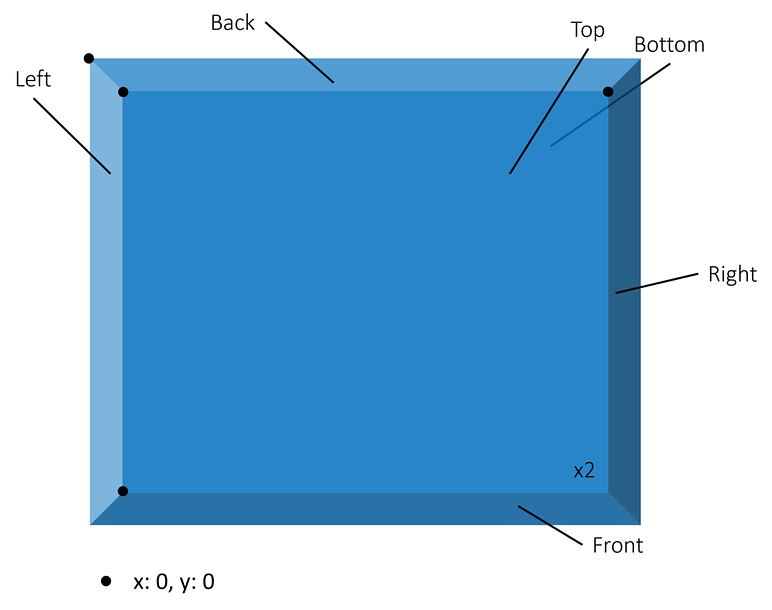
The two images below show how each side appears in the 2D view. Imagine pressing the 3D box above and flattening it to see this perspective:
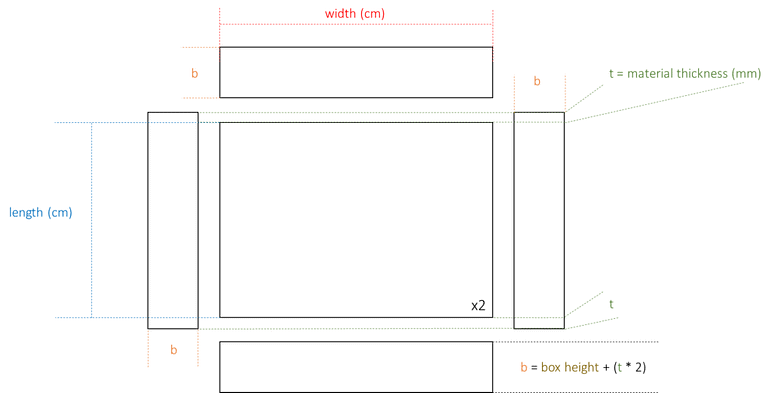
If the inner-sizing option is used (enabled by default), the left and right sides will have a greater height/length to cover the back and front sides. Additionally, the left, right, back, and front will be slightly taller to maintain the specified inner volume. The top and bottom will then fit in accordingly. The components on sides (except top and bottom) will be repositioned considering these changes. For example, if you put a component at x = 0, y = 0 for right side, this component will be located at x = b, y = b.
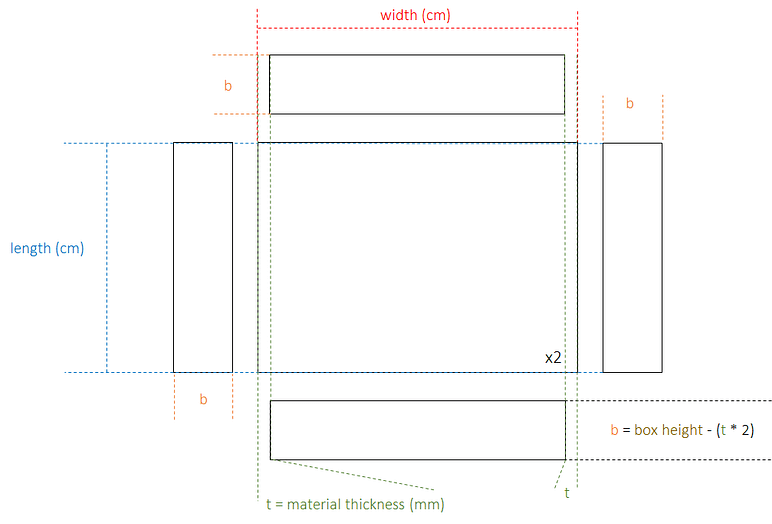
If the outer-sizing option is enabled (via --outer-sizing command-line argument), the front and back sides will be slightly shorter to align with the width of the left and right sides. Similarly, all four sides (left, right, front, and back) will be slightly adjusted to maintain the specified outer volume. The top and bottom will then fit precisely on top of and beneath the other sides. In this case, unlike inner-sizing, components will be placed exactly as you specify it without any adjustments. Below, both variations for the sizing are shown in 3D:
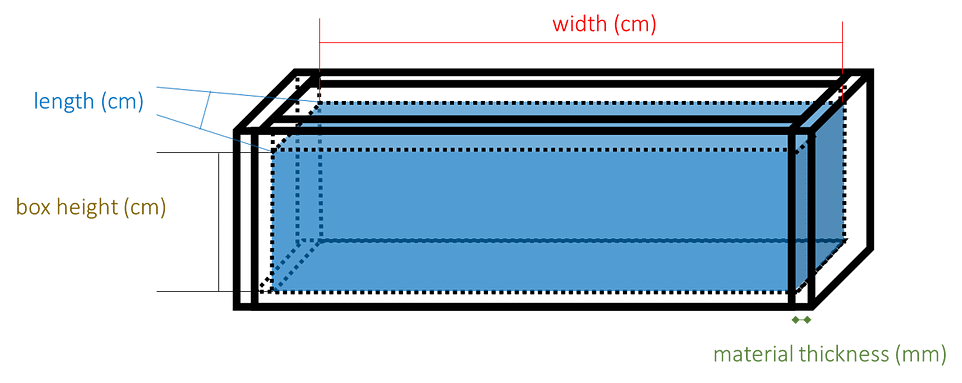
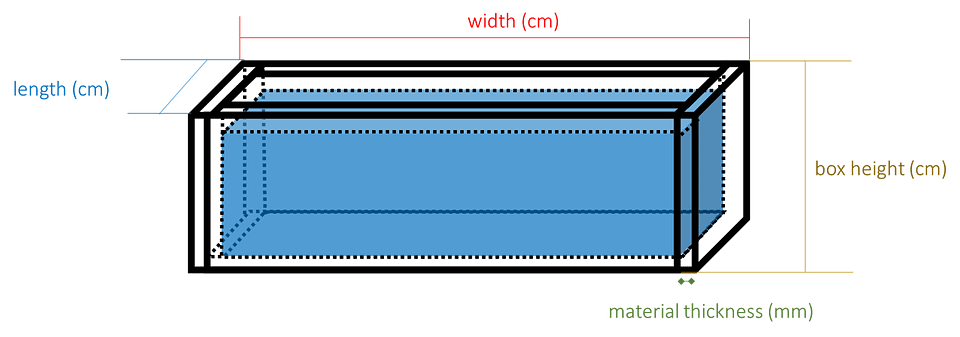
Sizing with outer-sizing options.
Tip: If you want the overall size to be exactly as you specify in the JSON file, use the --outer-sizing option. If you want the usable inner area to be the same as you define, leave it as default.